‘therrific
I was a little late on the Panther bandwagon (where by ‘late’ I mean I installed it a full five days after release… instead of the industry–standard same–day installation), but that certainly won’t stop me from going on and on about the exciting new everythings held within. Was it worth the $130? I’m gonna say no. $60 would’ve been a good price; but hey, it’s Apple’s ball.
- The speed increase is nothing short of spectacular. Phenomenal. I’m running a 700MHz G4, and while I’ve spent my time over the last year wading through the gluggier aspects of Mac OS X, the increased snappiness™ is giving me a big rubbery one.
- Smooth scrolling is nice.
- Exposé is, as expected, great. It gives the Mac superior document–centric window management in an incredibly practical and elegant fashion, maintaining Apple’s decades–old application–centric window management paradigm at the same time. I’ve stopped using tabbed browsing… if that’s any indicator of how great exposé is. Now I just open links in new windows behind the current one, exposé–ing whenever I feel obliged. It sounds kinda wacky, and I may go back to tabbed browsing at any moment, but I’ve found it to be incredibly… good.
- The speed increase is awesome
- The new finder is superb, even with the brushed metal. Or rather, the sidebar is a great idea well implemented.
- Mail is well done… not that it was ever poorly done, they’ve just managed to top themselves once again.
- The speed increase? Great.
Most of the other features, things like Fast User Switching, Secure Empty Trash and FileVault, won’t find a great deal of use on my one–user–only deskbound Mac… but I’m sure they’re welcome in other homes and any business. Fast User Switching, incidentally, is probably a fantastic way for Joe Blow to work with virtual desktops; just set up a bunch of accounts for yourself (sans password, if you want really fast user switching [making sure they’re not admin accounts, of course]) and switch between them at will.
It’s not all raindrops on roses and whiskers on kittens though… I have the usual laundry–list of complaints, too. This just wouldn’t be decaffeinated dot org if there weren’t complaints about software, so here goes:
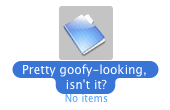 Much as I like the new Finder, what the hell is the deal with the new look for selected icons? While I appreciate that the greyed–out area surrounding the icon gives everyone a visibly bigger and better drag region (this is important from a usability perspective, don’t even pretend it isn’t), why is the label so goofy and out–of–place? I don’t often pretend to be a graphic designer, so maybe I’m way off base, but the guys on the Apple graphic design team certainly are graphic designers, and I’m left feeling they could’ve done better here.
- Unsure of whether this is a by–product of some weird residual preferences in my library folder, or whether it’s because my Home folder is actually a Home partition that has been conveniently re–positioned with NetInfo Manager (likely neither of the above), but I don’t get the cool zoomy effect when I double click things. If I create other users (whose Home folders reside in the usual place and aren’t sufficiently crufted up from Jaguar) they get the zooms, but I do not. It makes me a little sad… particularly when I’m the only user. I’ll be interested to see what the problem is, if I can ever fix it.
OK… that list wasn’t so long. Panther rocks my socks. Goodnight.